1. Technical Overview
1.1 Vehicle Identification Plate
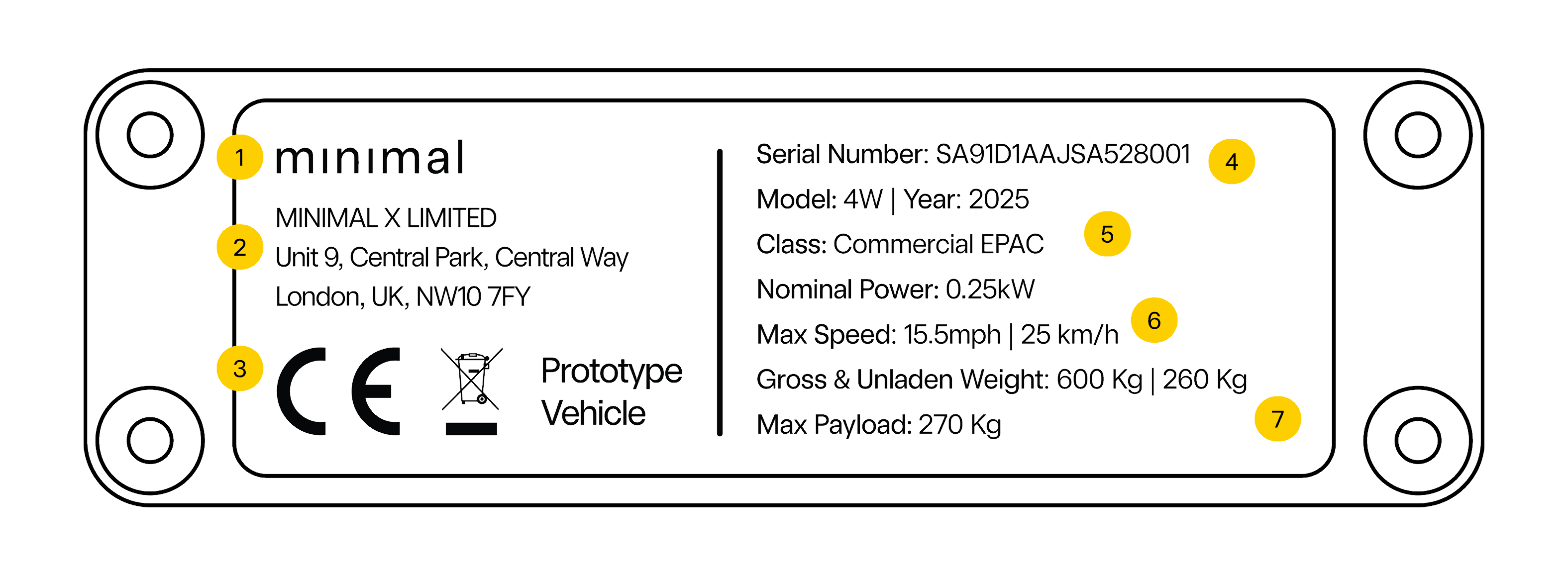
- Minimal Logo and Registered Company Name.
- Company Address and UK Postcode.
- Conformity Marks Including - Conformité Européene (CE) & WEEE Mark
- Vehicle Serial Number.
- Vehicle Type and Vehicle Class.
- Motor Output Power (Nominal power) and Vehicle Max Speed.
- Total Vehicle Weights - Loaded, Unloaded and Payload Capacity.
1.2 System Architecture
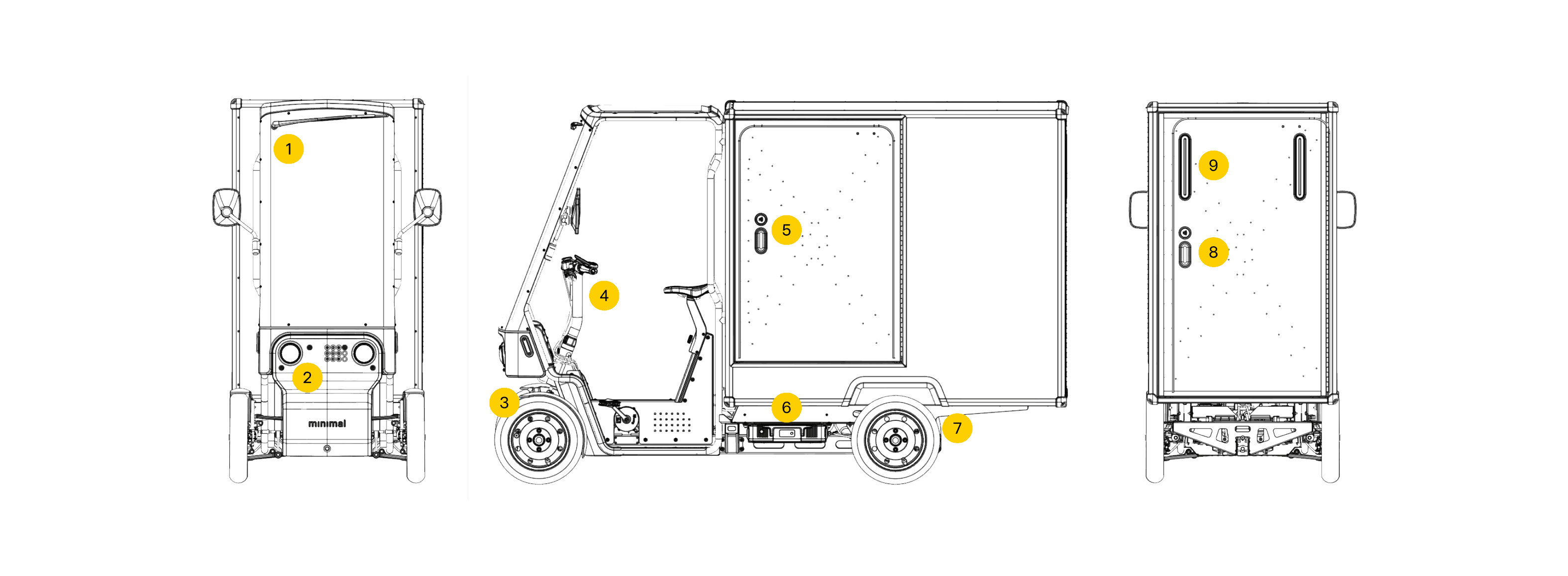
- Front windscreen and windscreen wiper.
- Front lights, indicators and bumper.
- Front wheels and tyres.
- Cabin and vehicle controls.
- Side loading door, NFC security lock/unlock point with handle.
- 48V battery locations (RH and LH locations on opposite sides of vehicle).
- Rear wheels and tyres.
- Rear loading door, NFC security lock/unlock point with handle.
- Rear lights and indicators.
1.2.1 Getting Set up
The following sections of the user guide assist in your understanding of how to gain access to the vehicle and operate it safely.
Vehicle Access
Information on how to gain access to the vehicle.
Vehicle Controls
Overview of where vehicle controls are located as well as key vehicle features.
Pre-Journey Checklist
Checklist of key items to verify before starting your journey.
Adjusting Controls
Basic overview of how to adjust mirrors, seat and handle bar controls.
Visual Inspections
User level inspections to be conducted before journey.
Tyre Checks
Basic tyre checks performed before journey.
Battery System
How to charge, insert and remove batteries that go into the vehicle.
Maintenance Overview
User level instructions for how to generally maintain the vehicle throughout use.
Safety
General safety information and guidelines for operating the vehicle.
Troubleshooting
Information on common issues and how to resolve them.
Note
Please read the user guide if you have questions relating to vehicle controls and how they are used.
It is advised you understand the limits of the vehicle before operating it.
1.2.2 Firmware Summary
The Minimal Pedal 4 uses custom firmware embedded into Minimal vehicles in order to collect data about the rider performance, journey and safety features.
This information is relayed to the BCU (Body Control Unit) which in turn sends the data to be stored on the Minimal online fleet management dashboard via the TCU (Telematics Control Unit).
Note
Information on data collected & your data rights can be found in the user guide under section: 22.
This data is processed for vehicle & user safety only.
Caution
Firmware is embedded into the vehicle and should not be tampered with at any time.
Doing so could render the vehicle inoperable and void any warranty or support agreements.
1.2.3 Firmware Management
The Minimal Pedal 4 will be delivered with the latest stable version of firmware installed on all vehicle control units.
This firmware is managed and updated remotely via the cloud by Minimal when new versions are released. This allows firmware to be safely handled while providing easy access to latest versions and features along with bug fixes.
Note
Please contact Minimal for any questions relating to firmware versioning and cloud updates via www.minimal.tech
1.2.4 Firmware Version Tracking
Versioning of firmware is currently handled through semantic versioning such as:


- Major version changes involve drastic changes to either vehicle hardware, wiring or major reworks.
- Minor version changes include new functions and features added to the firmware without hardware changes.
- Patches are used for fixing bugs and firmware errors, with no limit to the number of patches per version.
1.2.5 Firmware Locking & Updates
Firmware uploaded to the BCU, TCU and AVAS modules is locked at the time of vehicle assembly and updated remotely through the cloud.
Note - Update Procedure
Updates are released via the cloud and are directly downloaded onto the vehicle remotely via the TCU.
Please contact Minimal should you require updates to vehicle firmware.
Attention - Do Not Remove PCBs
Doing so can damage components and vehicle functions.
It is advised you seek a replacement electronics module from Minimal to ensure systems remain functional.